Run the offline product demo
This walkthrough exercises the checked data platform, opening and clock
analytics, and analyst fixture replay from tracked files. It needs no API key,
model call, Lichess download, or previously built real dataset. The six PGN
records are authored synthetic examples, not observations of players. Run
every command below from the repository root, the directory containing
pyproject.toml and uv.lock.
Six input records produce four accepted games: one record repeats a game and one is excluded because it is casual. This fixture quarantines no records.
1. Install the locked environment
Install uv if it is not already available, then:
uv sync --locked --no-editable --extra dashboard
The first installation may download Python packages. --no-editable installs
the project wheel; subsequent demo commands use --offline. No personal
provider configuration is needed. If the default uv cache is inaccessible,
prefix uv commands with UV_CACHE_DIR=.uv-cache.
2. Build and check the synthetic snapshots
uv run --locked --offline --no-editable --extra dashboard chesslab demo --scope all
The command copies the tracked PGN and required contracts into the ignored,
isolated work/portfolio-demo/project directory. It ingests and validates the
games, publishes a source snapshot and an analytical move snapshot, compares
opening and clock results with independent fixture values, and replays three
checked analyst plans. The JSON printed to the terminal is also saved at
work/portfolio-demo/project/reports/portfolio-demo.json. The source and
analytical snapshot IDs are generated from the checked inputs; use the IDs in
your own output rather than copying IDs from another checkout.
Look for these fields in the result:
| JSON field | Expected fixture result |
|---|---|
source_kind and live_requests |
synthetic_test_fixture and 0 |
source_counts |
6 seen, 4 accepted, 1 identical duplicate, 1 casual exclusion, 0 quarantine or conflicts |
draw_rate |
1 draw / 4 eligible games = 0.25 |
opening_usage |
Sicilian Defense 2/4; French Defense 2/4 known-opening eligible games |
white_player_score |
Sicilian 0.50; French 0.75, each over two eligible white-player games |
clock_pressure.30_to_59 |
8 eligible moves, 6 evaluable moves, 3 proxy errors; 3/6 = 0.50 |
clock_pressure.10_to_29 and .60_plus |
No eligible or evaluable moves; rate is null, not zero |
analyst.statuses |
opening: answered, clarification: needs_clarification, unsupported: unsupported |
analyst.scored_opening |
passed: true under fixture rubric portfolio-1.0 |
These values are specified separately in the hand-checked reference and source PGN. The clock metric is an exploratory deterioration proxy based on available source evaluations; its eligible and evaluable denominators differ. It is not evidence that time pressure caused a mistake.
To check repeatability, run the same demo command again. source_snapshot_id,
analytical_id, counts and metric values should match the first run. The command
keeps its output in work/portfolio-demo, separate from real data/ pointers.
The complete demo does not run the optional dbt, Dagster or Prefect adapters;
their local commands are in the runbook and
orchestration guide.
3. Explore the six dashboard views
Start Streamlit from the same repository root:
CHESSLAB_PROJECT="$PWD/work/portfolio-demo/project" \
  uv run --locked --offline --no-editable --extra dashboard \
  streamlit run src/chess_analytics/dashboard/dashboard.py
Open the local URL printed by Streamlit and use the View selector in the
sidebar. Keep this terminal running while you explore; press Ctrl+C to stop.
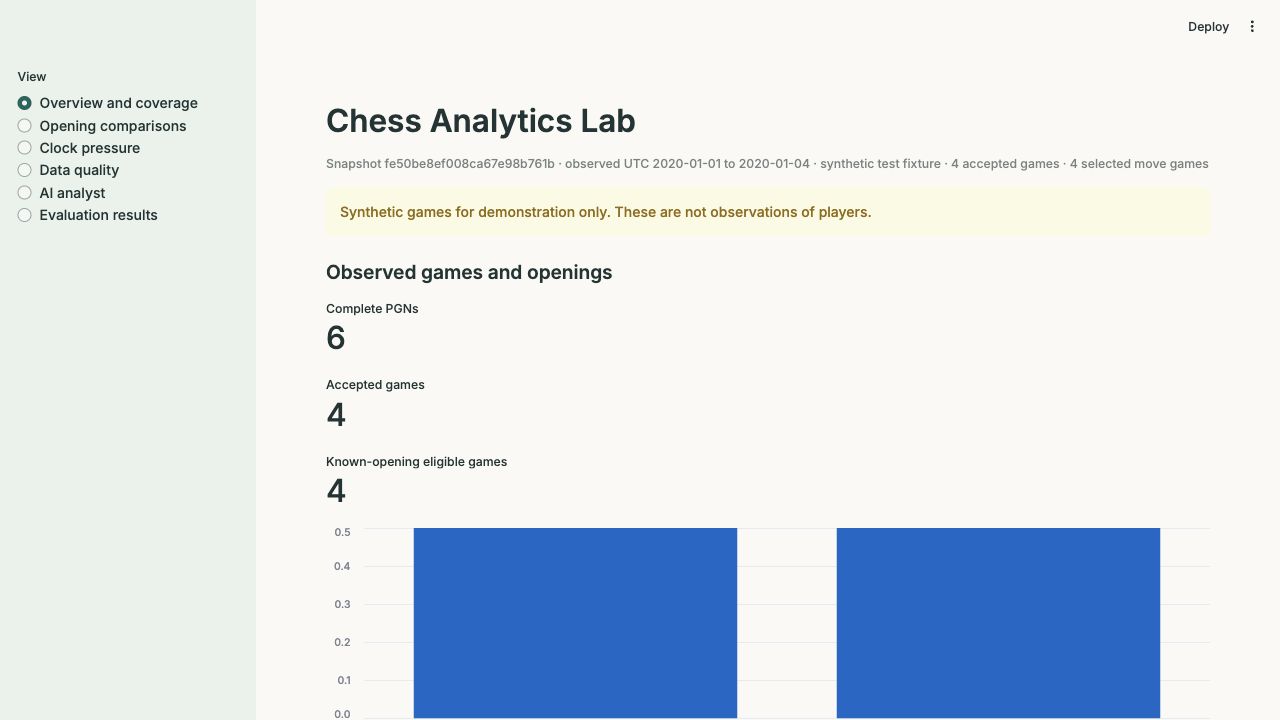
The top caption should say synthetic test fixture and show four accepted
games. CHESSLAB_PROJECT points this dashboard process at the demo workspace;
without it, the app looks for a checked analytical snapshot in the repository's
real data/ directory.
| View | What to try and expect |
|---|---|
| Overview and coverage | Confirm 6 complete PGNs, 4 accepted games and 4 known-opening eligible games. Opening shares use that last denominator. |
| Opening comparisons | Choose white, rating band 1400–1600, base 60, increment 0. Sicilian's score is 1/2 and French's is 1.5/2. Both families have only two games, so heed the low-support warnings. |
| Clock pressure | Select 30_to_59: expect 3/6 = 50% proxy errors and 6/8 = 75% evaluation coverage. Select 10_to_29 or 60_plus: expect an explicit empty state. |
| Data quality | Inspect source counts, observed dates, selected-game counts and the synthetic_test_fixture source kind. |
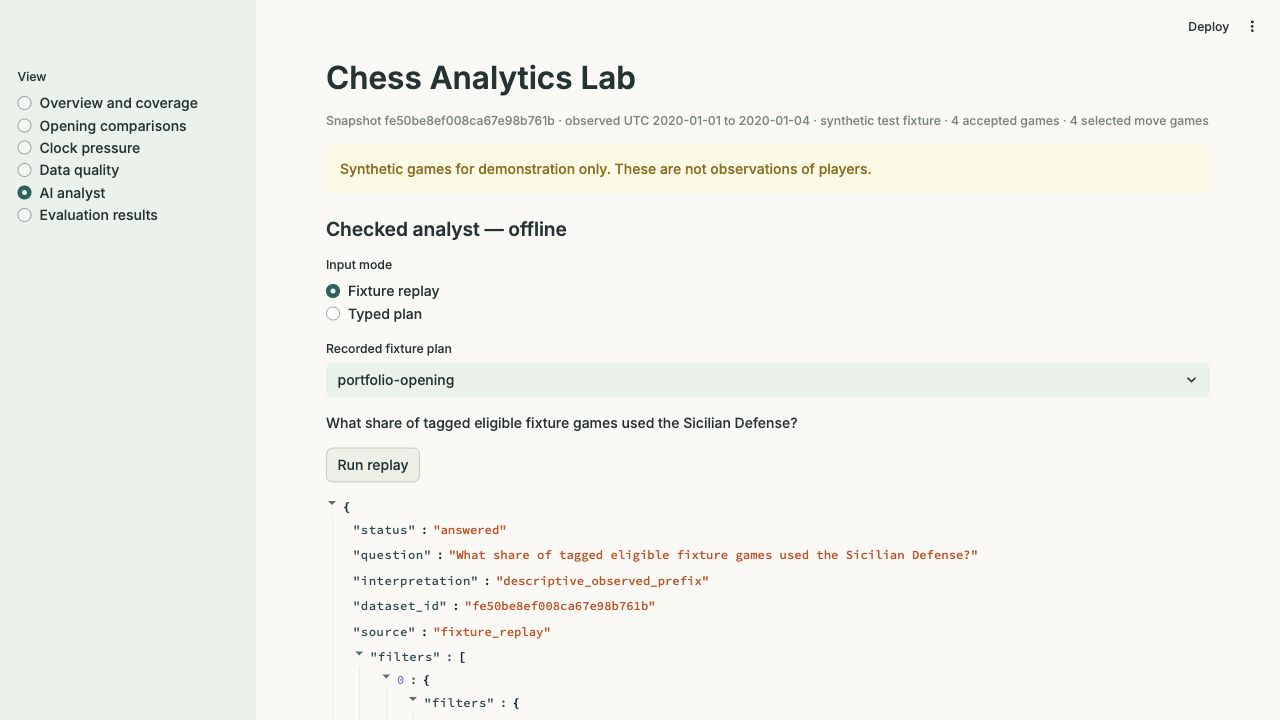
| AI analyst | Leave Fixture replay selected, choose portfolio-opening, then click Run replay. The answer has a checked metric and an evidence ID bound to this snapshot. Try portfolio-clarification and portfolio-unsupported for the two boundary statuses. |
| Evaluation results | Compare the synthetic fixture score with the historical M5 replay harness and M7 live checkpoint. Those three panels describe different evidence; the M7 result did not come from these four games. |
The dashboard's Typed plan mode can run an explicitly entered reviewed-tool JSON plan offline. Typing a question alone does not ask a model to create a plan. The default plan queries Sicilian opening usage. Live provider calls are not part of this interface or walkthrough.
4. Replay the opening answer from the CLI
This invokes the same checked replay path without Streamlit. The question must match the recorded fixture exactly:
uv run --locked --offline --no-editable --extra dashboard python -m chess_analytics.analyst \
  --project work/portfolio-demo/project replay \
  'What share of tagged eligible fixture games used the Sicilian Defense?' \
  --fixture work/portfolio-demo/project/evals/replay_plans/portfolio-opening.json
Expect status: "answered", a result of 2/4 = 0.5, source: "fixture_replay",
the demo's analytical dataset ID, and a nonempty evidence_ids list. The
fixture plan was authored in advance; this is a tool/replay check, not a model
response or model-accuracy result. The demo report also records the two
clarification/refusal statuses and the strict scoring check. For the historical
live study, including failed attempts and actual costs, use the
evaluation guide.
If a step fails
- If
uv run --offlinereports a missing package, complete the lockeduv synconce with network access, then rerun the offline command. - If Streamlit says the checked snapshot is unavailable, run
chesslab demo --scope allfirst and check thatCHESSLAB_PROJECTpoints to itsprojectdirectory. The dashboard does not silently fall back from this path. - After changing source code, reinstall the wheel, then rerun the demo. A changed implementation can produce new snapshot IDs without changing the expected fixture arithmetic:
sh
  uv sync --locked --offline --no-editable --extra dashboard \
    --reinstall-package chess-analytics-lab
The older foundation-only check is chesslab demo: 26 records seen, 22
accepted, and 4/20 eligible draws. To work with real Lichess archives, follow
data sources and the runbook; acquisition is
explicit and bounded, and published coverage means observed dates, not a full
month implied by an archive name.
Dashboard appearance
Run from the repository root to load the shared light theme and locally served
Inter font in .streamlit/config.toml. Restart Streamlit after theme changes.
The visual style guide explains font choices and screenshot capture;
the HTML guide provides smaller previews with links to full-size images.